
How to convert PDF files to Word using Google Drive
With Google Drive, you can easily convert PDF files to Microsoft Word documents without any PDF converter apps. Here's how!
If you've ever worked with PDFs, you'll undoubtedly know they can be difficult to edit, read, and use. There are many different tools that can try to solve this problem, but why download programs you don't even know will work when better solutions are already available?
Google Drive can open, read, and resave PDF files for you, virtually eliminating the hassle of converting PDFs. That's it.
recommend:How to fix the Err_Connection_Timed_Out error in Windows Google Chrome
How to convert PDF files to Word using Google Drive
- The first thing you need to do is sign in to your Google Drive and upload your PDF. This means that if you're wondering how to easily convert an entire website to PDF, this technique won't work, but it's useful for existing documents. If the document is particularly large, this may take some time.
- After uploading the document, double-click it. This will take you to preview the PDF document, where you can quickly read its contents. At the top, you should see a button labeled [button name missing]. Open with Google DocsClick this.
- This may take a little time, depending on the size of the document. For example, very large documents may take several minutes. However, once completed, your PDF should be in editable text format.
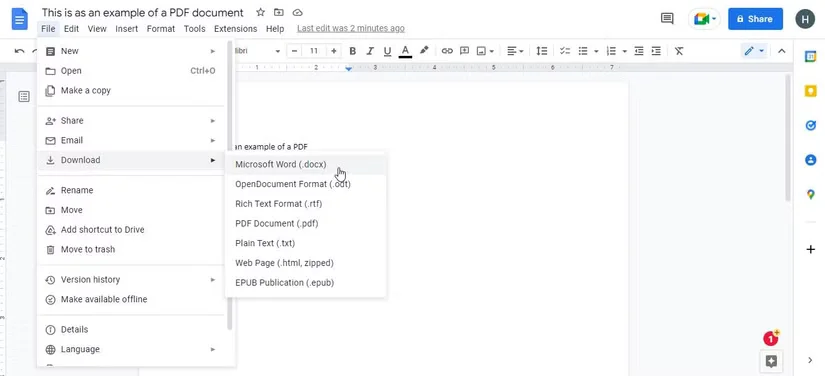
How to convert PDF files to Word using Google Drive - Alternatively, you might want to clean up some text. Converting PDFs to text documents like this can sometimes produce strange results, such as poor text alignment or spelling errors. You can clean it up manually if needed, or leave it as is. Or, you can always learn how to convert PDFs to Word for free.
- If you prefer Google Docs over Word, then you can stop here. However, to access it offline, you'll need to download it. You can do so by accessing... Files > Downloads Then select your desired file format. If you plan to use it with Word, then the .docx format is what you're looking for.
Make full use of Google Drive
As you can see, once you know what you need to do, converting PDF files to Word using Google Drive is a very simple process. Fortunately, the process is quick and easy to follow, so you can easily try it out and see how satisfied you are with the results.

 Chinese (China)
  English
  Chinese (Taiwan)
  Russian
  Japanese